
Fi-70f
Compact
Flatbed Scanner
Fast 1.3-second scanning for IDs, passports, and small-format documents. Built for customer-facing environments like hotel receptions, banks, and retail counters.
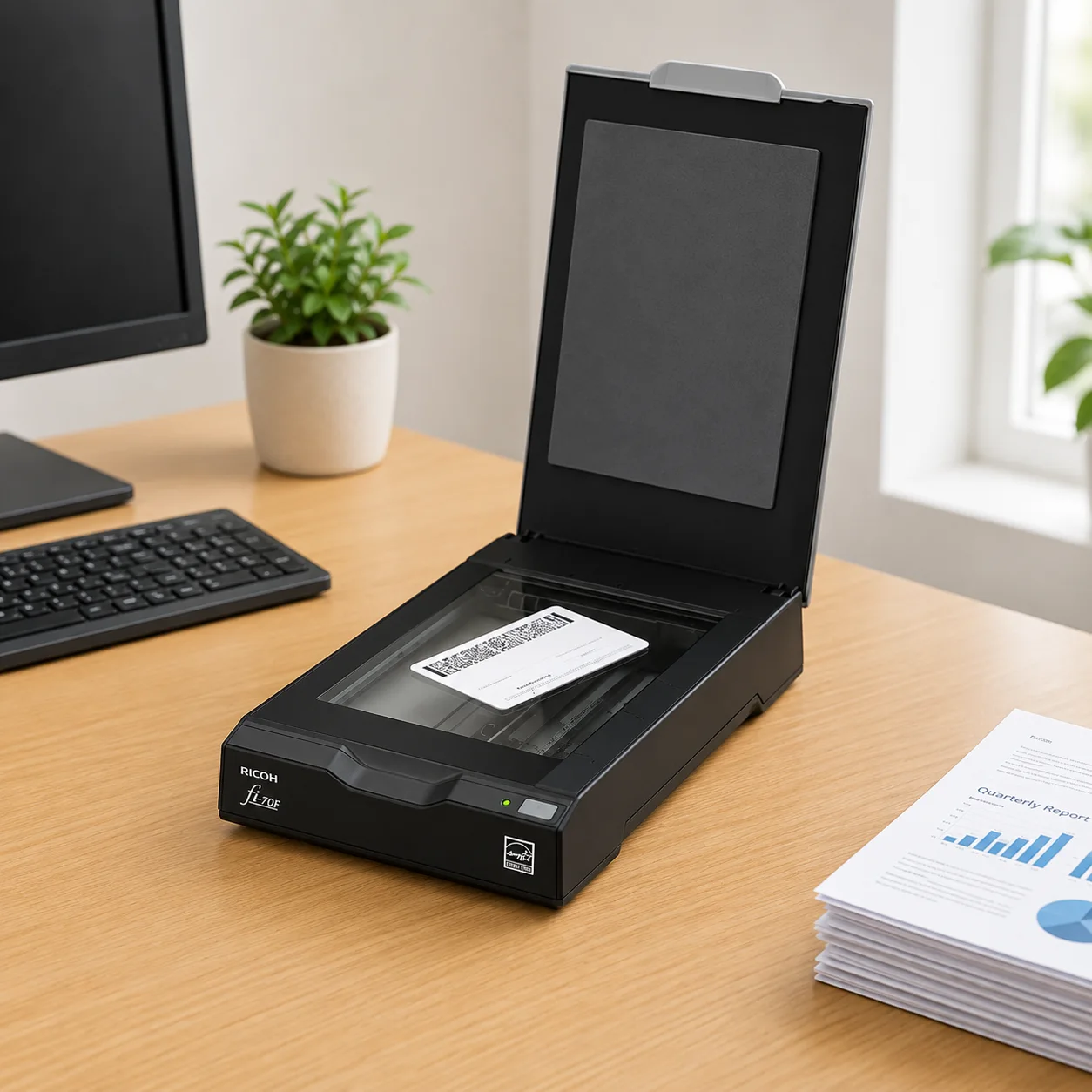
Designed for efficiency
Ultra-compact
Small footprint fits easily onto cramped reception desks and counters.
Coverless operation
Remove the need to open and close the lid for every document.
Mobile power
USB-bus powered option for portability without AC adapters.
Versatile capture
Perfect for IDs, passports, driver's licenses, and insurance cards.
Applications in Malaysia
Hospitality & Front Desk
- Guest ID and passport capture at hotel check-in
- Reservation form and registration card scanning
- Visitor pass and access document digitisation
- Quick counter-side document copies for guest records
Banking & Immigration Counters
- IC and passport verification during account opening
- KYC document capture at teller counters
- Visa and immigration document scanning at checkpoints
- Membership and application form digitisation
Retail & Membership Registration
- Loyalty card and membership form scanning
- ID capture for warranty and after-sales registration
- POS-side document copies for high-value purchases
- Small-format receipt and card digitisation
Why Choose Ricoh fi-70f
- 1.3-second colour scans keep front-desk queues moving instead of stalling on paperwork
- Coverless design means no lid to lift — place the document and scan immediately
- Ultra-compact 145 x 234 mm footprint fits tight counters, reception desks, and POS stations
- USB bus-powered option removes the need for a separate power adapter at mobile stations
- PaperStream IP auto-crops, deskews, and cleans up ID and card captures automatically
Ideal for hotel receptions, bank counters, immigration checkpoints, and retail registration desks across Malaysia that need instant ID capture without a full-size scanner.
Key Features
Compact & space-saving design
With a tiny footprint of just 145 x 234 mm, the fi-70f fits effortlessly onto cramped front desks, registration counters, hotel check-in desks, and retail counters.
High-speed capture
Instantly digitizes A6-sized documents in 1.3 seconds (200 dpi color) or 0.9 seconds (200 dpi grayscale/monochrome) using AC power.
Coverless operation
Designed without a lid requirement to eliminate repetitive cover operations. Simply place a document on the glass and scan instantly.
USB bus-powered portability
Can be powered entirely through a computer's USB port, removing the need for AC adapters and supporting mobile on-the-go scanning.
Advanced image correction
Leverages PaperStream IP to automatically crop, rotate, and deskew documents on the glass, producing high-clarity, OCR-ready images every time.
Built for Counter-Side Use
Sized and speed-tuned specifically for face-to-face service points where guests and customers are waiting.
Ricoh fi-70f compact scanner
- Compact & space-saving design With a tiny footprint of just 145 x 234 mm, the fi-70f fits effortlessly onto cramped front desks, registration counters, hotel check-in desks, and retail counters.
- High-speed capture Instantly digitizes A6-sized documents in 1.3 seconds (200 dpi color) or 0.9 seconds (200 dpi grayscale/monochrome) using AC power.
- Coverless operation Designed without a lid requirement to eliminate repetitive cover operations. Simply place a document on the glass and scan instantly.
- USB bus-powered portability Can be powered entirely through a computer's USB port, removing the need for AC adapters and supporting mobile on-the-go scanning.
- Advanced image correction Leverages PaperStream IP to automatically crop, rotate, and deskew documents on the glass, producing high-clarity, OCR-ready images every time.
Full technical specifications
| Scanner type | Flatbed, Simplex |
| Scan speed (A6 Color, AC power) | 1.3 seconds (200 dpi) · 2.0 seconds (300 dpi) |
| Scan speed (A6 Grayscale/Mono, AC power) | 0.9 seconds (200 dpi) · 1.0 second (300 dpi) |
| Scan speed (USB bus powered) | 2.0 seconds (Color 200/300 dpi, Grayscale/Monochrome 200/300 dpi) |
| Image sensor | Color CIS x 1 |
| Light source | 3-color LED (RGB) x 1 |
| Optical resolution | 600 dpi |
| Output resolution | 50–600 dpi (1 dpi increments), up to 1,200 dpi via driver |
| Output format / color depth | Color: 24-bit · Grayscale: 8-bit · Monochrome: 1-bit |
| Maximum document size | A6 (105 x 148 mm / 4.1 x 5.8 in.) |
| Minimum document size | None (flatbed scanning) |
| ADF capacity | None (Flatbed scanner) |
| Interface | USB 2.0 / USB 1.1 (Type-B) |
Specifications sourced from the official Ricoh/PFU datasheet (www.pfu.ricoh.com / official RICOH fi-70F datasheet).
General specifications
| Power requirements | AC 100–240V ±10% or USB bus power (5V) |
| Power consumption (AC powered) | 6W or less (Operating) · 2W or less (Sleep) · 0.5W or less (Standby) |
| Power consumption (USB powered) | 5W or less (Operating) · 1.5W or less (Sleep) · 0.5W or less (Standby) |
| Operating environment | 5–35°C (41–95°F), 20–80% relative humidity (non-condensing) |
| Environmental compliance | ENERGY STAR, RoHS |
| Dimensions (W x D x H) | 145 x 234 x 40 mm (5.7 x 9.2 x 1.6 in.) |
| Weight | 0.9 kg (1.98 lb) |
| Supported operating systems | Windows 11, Windows 10, Windows Server 2022 / 2019 / 2016 |
| Included software / drivers | PaperStream IP (TWAIN/TWAIN x64/ISIS), WIA Driver, PaperStream Capture, Software Operation Panel, Error Recovery Guide |
| Box contents | Scanner, USB cable, AC adapter, AC cable, Setup DVD-ROM, Safety Precautions |
Power, environment, OS, and software details from the official Ricoh/PFU datasheet.
Product video
Brochure
Price in Malaysia
Single Unit Order
Suitable for home offices, personal workspaces, and individual business users.
Bulk Office Purchase
Ideal for SMEs, companies, schools, and administrative departments requiring multiple units.
Large Quantity Orders
Suitable for tenders, government departments, and organisation-wide deployment projects.
Pricing depends on order quantity, delivery location, and project requirements. Contact us for the latest Ricoh fi-70f quotation and wholesale pricing in Malaysia.
Comparison Overview
| Feature | Ricoh fi-70f | Generic Scanner | Manual Filing |
|---|---|---|---|
| Scan Speed | 1.3 sec / A6 colour scan | Slower | N/A |
| Image Quality | 600 dpi + PaperStream IP | Standard | N/A |
| Connectivity | USB 2.0 | USB Only | None |
| Software | PaperStream IP + Capture | Basic | None |
| Malaysia Supplier Support | Yes ✓ | Limited | No |
IMPROVE YOUR FRONT-OFFICE WORKFLOW
Explore the official product details for the fi-70f.
Frequently asked questions


